> ## Documentation Index
> Fetch the complete documentation index at: https://docs.sherpo.io/llms.txt
> Use this file to discover all available pages before exploring further.
# Payments
> Connect Stripe, monitor onboarding tasks, and review payouts and tax settings for your Sherpo organization.
Sherpo routes all paid transactions through [Stripe Connect](https://stripe.com/connect), ensuring secure processing, instant compliance, and automated payouts. Every organization must link a Stripe account before publishing paid products.
The **Payments** area in Sherpo Dash guides you through setup, highlights compliance alerts, and embeds Stripe dashboards for payouts and taxes. All in one place.
This guide explains how to setup Stripe Connect and manage Payments from the Dashboard. If you are looking for a guide about how checkout works for customers, check out this:
Built-in Stripe checkout with multiple payment methods, including BNPL.
***
## Payments page
To open the Payments page:
* Sign in to [Sherpo Dash](https://dash.sherpo.io).
* Click your profile icon in the top-left corner.
* From the sidebar, select **Payments**.
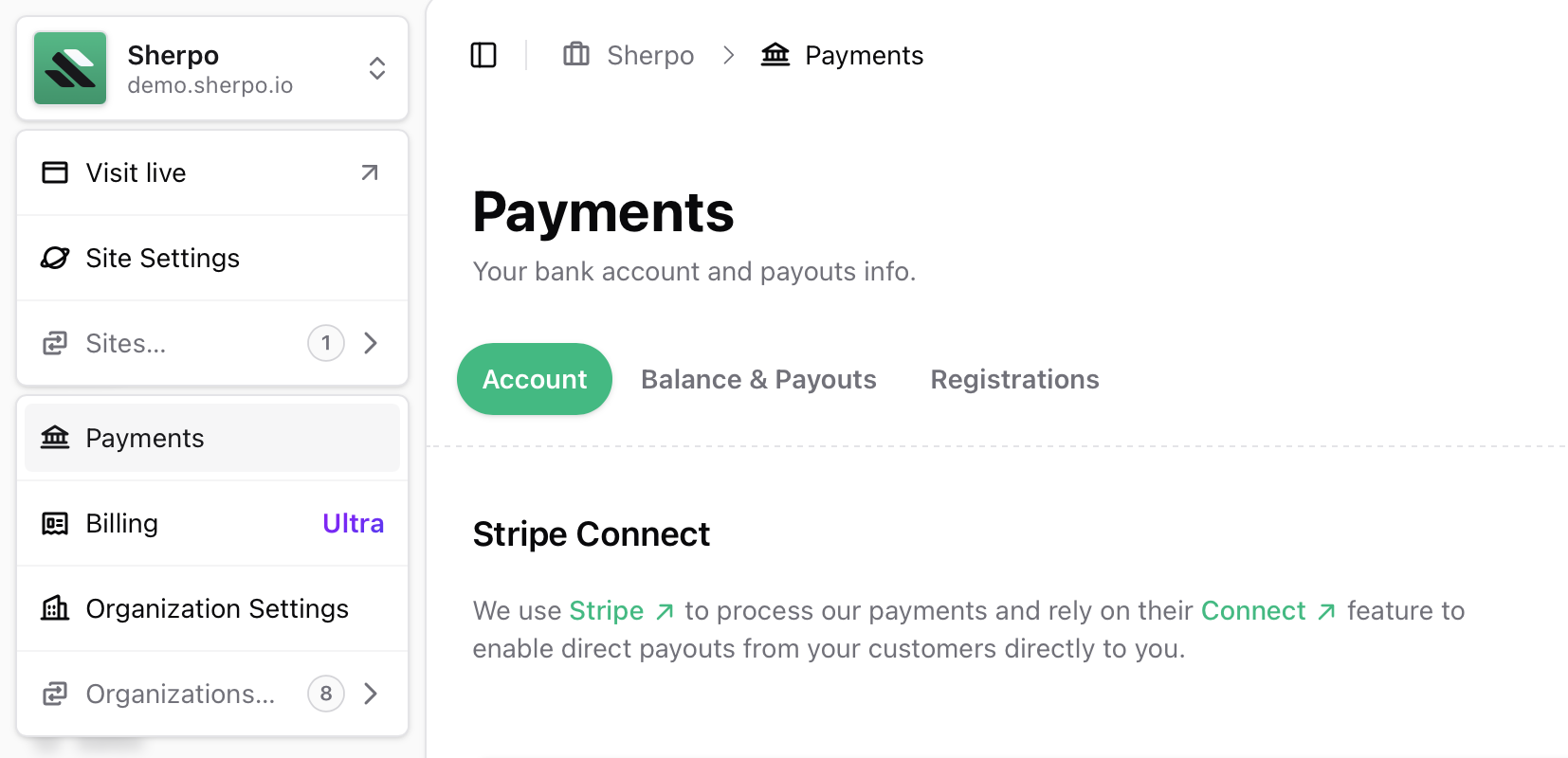 Use the green sub-navigation to switch between **Account**, **Balance & Payouts**, and **Registrations**. A banner at the top shows whether Stripe is fully connected or if onboarding steps are still pending.
You cannot publish paid products until your Stripe account is connected and verified.
***
## Set up or manage Stripe Connect
### Create a new account
Click **Set up Stripe Connect**, choose your **country of registration**, and complete Stripe’s hosted onboarding form. Sherpo will automatically create a platform account for you.
You cannot change the country later, so choose carefully before continuing.
### Resume onboarding
If Stripe still requires additional information (e.g., ID verification or business address), you’ll see **Update Stripe Connect**. Click it to resume the onboarding flow. Once verified, the alert at the top of the page will disappear.
### Manage an existing account
After onboarding, you can reopen the **Update Stripe Connect** flow anytime to update:
* Bank details
* Business information
* Contact person
***
## Track balances and payouts
Switch to **Balance & Payouts** to view your live Stripe balance directly within Sherpo. You can:
* Check available and pending balances.
* Inspect historical and future payouts.
* Drill into individual payout details without leaving Sherpo's Dashboard.
* Export payout data for accounting.
* Request an **instant payout** (if supported by your bank).
Use the green sub-navigation to switch between **Account**, **Balance & Payouts**, and **Registrations**. A banner at the top shows whether Stripe is fully connected or if onboarding steps are still pending.
You cannot publish paid products until your Stripe account is connected and verified.
***
## Set up or manage Stripe Connect
### Create a new account
Click **Set up Stripe Connect**, choose your **country of registration**, and complete Stripe’s hosted onboarding form. Sherpo will automatically create a platform account for you.
You cannot change the country later, so choose carefully before continuing.
### Resume onboarding
If Stripe still requires additional information (e.g., ID verification or business address), you’ll see **Update Stripe Connect**. Click it to resume the onboarding flow. Once verified, the alert at the top of the page will disappear.
### Manage an existing account
After onboarding, you can reopen the **Update Stripe Connect** flow anytime to update:
* Bank details
* Business information
* Contact person
***
## Track balances and payouts
Switch to **Balance & Payouts** to view your live Stripe balance directly within Sherpo. You can:
* Check available and pending balances.
* Inspect historical and future payouts.
* Drill into individual payout details without leaving Sherpo's Dashboard.
* Export payout data for accounting.
* Request an **instant payout** (if supported by your bank).
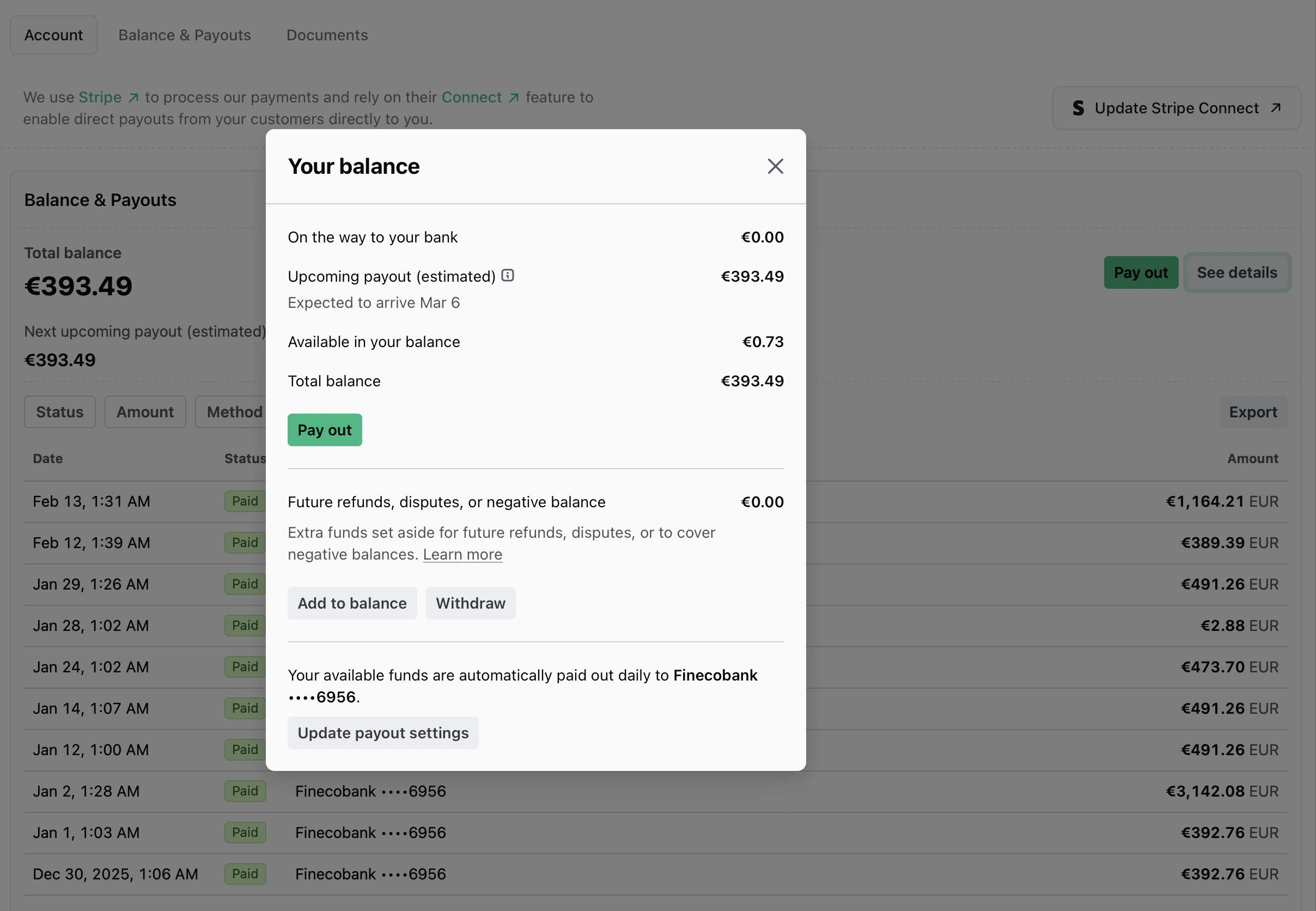 Stripe payouts operate on a **7-day rolling schedule** by default.
If you need to **pause payouts** or **update banking details**, return to the **Account** tab and relaunch the **Update Stripe Connect** flow.
***
## Monitor Stripe notifications
The **Organization notifications** banner automatically surfaces real-time updates from Stripe, including:
* Missing documents
* Payout delays
* Compliance actions required
Resolve the tasks directly in Stripe to clear the alerts. Sherpo hides the banner once Stripe confirms that no further action is needed.
***
## Review compliance documents
The **Documents** card embeds Stripe’s Connect Documents view, allowing you to download:
* Service agreements
* Onboarding confirmations
* Compliance files
This section appears automatically after you connect Stripe.
***
## Manage tax registrations (optional)
The **Registrations** tab integrates with **Stripe Tax**, letting you:
* Enable Stripe Tax on your account.
* Add or edit tax registrations by country.
* Monitor tax thresholds before registration becomes required.
Sherpo does not file or remit taxes on your behalf. You’re responsible for any returns and payments due to tax authorities.
***
## FAQ
Yes. All paid Sherpo products use Stripe Connect. You must complete onboarding before your checkout pages can process transactions.
Yes. During setup, you can log in with your existing Stripe credentials. Sherpo will link your existing account to your organization.
No. Stripe locks the account country during onboarding. To change it, you’d need to disconnect and create a new Stripe account.
Payouts are usually sent on a **7-day rolling basis**, depending on your region and bank. Instant payouts are available for eligible accounts.
Not yet. Currently, Sherpo supports payments only through **Stripe Connect** for compliance and automation consistency.
Sherpo does not charge any additional fees beyond the standard **Stripe transaction fee**. Your plan’s revenue share applies automatically.
The banner at the top of your **Payments** page will display **“All set”** when your account is fully verified. You can also confirm directly from Stripe’s dashboard.
No. Sherpo surfaces Stripe Tax settings but does not file or remit taxes. You remain responsible for any tax obligations.
Stripe payouts operate on a **7-day rolling schedule** by default.
If you need to **pause payouts** or **update banking details**, return to the **Account** tab and relaunch the **Update Stripe Connect** flow.
***
## Monitor Stripe notifications
The **Organization notifications** banner automatically surfaces real-time updates from Stripe, including:
* Missing documents
* Payout delays
* Compliance actions required
Resolve the tasks directly in Stripe to clear the alerts. Sherpo hides the banner once Stripe confirms that no further action is needed.
***
## Review compliance documents
The **Documents** card embeds Stripe’s Connect Documents view, allowing you to download:
* Service agreements
* Onboarding confirmations
* Compliance files
This section appears automatically after you connect Stripe.
***
## Manage tax registrations (optional)
The **Registrations** tab integrates with **Stripe Tax**, letting you:
* Enable Stripe Tax on your account.
* Add or edit tax registrations by country.
* Monitor tax thresholds before registration becomes required.
Sherpo does not file or remit taxes on your behalf. You’re responsible for any returns and payments due to tax authorities.
***
## FAQ
Yes. All paid Sherpo products use Stripe Connect. You must complete onboarding before your checkout pages can process transactions.
Yes. During setup, you can log in with your existing Stripe credentials. Sherpo will link your existing account to your organization.
No. Stripe locks the account country during onboarding. To change it, you’d need to disconnect and create a new Stripe account.
Payouts are usually sent on a **7-day rolling basis**, depending on your region and bank. Instant payouts are available for eligible accounts.
Not yet. Currently, Sherpo supports payments only through **Stripe Connect** for compliance and automation consistency.
Sherpo does not charge any additional fees beyond the standard **Stripe transaction fee**. Your plan’s revenue share applies automatically.
The banner at the top of your **Payments** page will display **“All set”** when your account is fully verified. You can also confirm directly from Stripe’s dashboard.
No. Sherpo surfaces Stripe Tax settings but does not file or remit taxes. You remain responsible for any tax obligations.