> ## Documentation Index
> Fetch the complete documentation index at: https://docs.sherpo.io/llms.txt
> Use this file to discover all available pages before exploring further.
# Prices & Sales
> Manage prices, coupons, and per-product revenue analytics from the product workspace.
Each Sherpo product has its own **Prices** and **Sales** tabs so you can set monetization rules and monitor performance without leaving the workspace.
***
## Prices tab
Use the **Prices** tab to configure how a product charges customers and applies discounts.
 ### Base price
Set or update your product’s main price. Sherpo supports both free and paid products.
* Set a one-time price, tip-based amount, or fundraising target.
* Sherpo verifies your **Stripe Connect** setup: paid products only work when your Stripe account is fully onboarded.
* Price updates propagate instantly to all checkout links and embeds.
To update the base price, click **Update price** and confirm:
### Base price
Set or update your product’s main price. Sherpo supports both free and paid products.
* Set a one-time price, tip-based amount, or fundraising target.
* Sherpo verifies your **Stripe Connect** setup: paid products only work when your Stripe account is fully onboarded.
* Price updates propagate instantly to all checkout links and embeds.
To update the base price, click **Update price** and confirm:
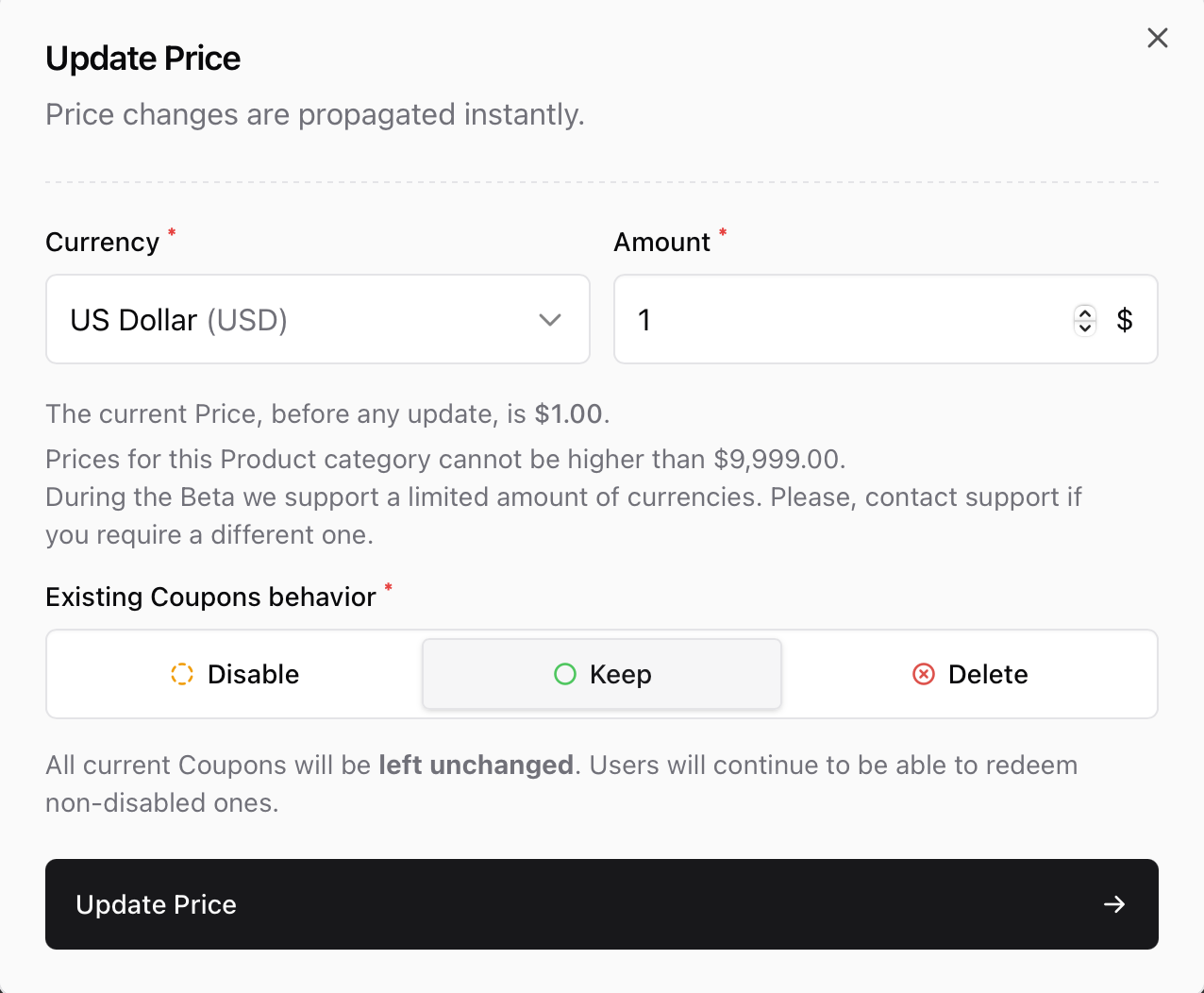 The modal lets you:
* Choose a **currency** and **amount** (up to \$9,999 per product).
* Define how **existing coupons** behave after the change:
* **Disable** – Temporarily pause active coupons.
* **Keep** – Leave all coupons unchanged (default).
* **Delete** – Remove them entirely.
Sherpo applies the change immediately across your storefront.
***
### Coupons & adjustments
Coupons appear directly below the base price card and include details like value, availability, and usage limits.
* Create percentage or fixed-amount discounts tied to your product.
* Limit coupons by **date**, **quantity**, or **audience** (e.g., affiliates).
* Edit or disable existing coupons via the overflow menu (•••).
* **Coffee** and **Goal** products use specialized dialogs for tips or fundraising targets instead of coupons.
### Affiliates
If you’ve set up affiliate revenue sharing, you’ll see partners linked directly under the **Coupons** section.
* Configure each affiliate’s **commission rate** and **email**.
* Track generated revenue per partner.
* Disable or remove a partner at any time if a campaign ends.
Affiliates are connected through the same **Stripe Connect** integration you use for payouts.
If you want to know more about coupons & affiliates, go here:
See how to create and handle coupons & affiliates.
***
## Sales tab
The **Sales** tab provides per-product performance data and transaction history.
The modal lets you:
* Choose a **currency** and **amount** (up to \$9,999 per product).
* Define how **existing coupons** behave after the change:
* **Disable** – Temporarily pause active coupons.
* **Keep** – Leave all coupons unchanged (default).
* **Delete** – Remove them entirely.
Sherpo applies the change immediately across your storefront.
***
### Coupons & adjustments
Coupons appear directly below the base price card and include details like value, availability, and usage limits.
* Create percentage or fixed-amount discounts tied to your product.
* Limit coupons by **date**, **quantity**, or **audience** (e.g., affiliates).
* Edit or disable existing coupons via the overflow menu (•••).
* **Coffee** and **Goal** products use specialized dialogs for tips or fundraising targets instead of coupons.
### Affiliates
If you’ve set up affiliate revenue sharing, you’ll see partners linked directly under the **Coupons** section.
* Configure each affiliate’s **commission rate** and **email**.
* Track generated revenue per partner.
* Disable or remove a partner at any time if a campaign ends.
Affiliates are connected through the same **Stripe Connect** integration you use for payouts.
If you want to know more about coupons & affiliates, go here:
See how to create and handle coupons & affiliates.
***
## Sales tab
The **Sales** tab provides per-product performance data and transaction history.
 ### Metrics
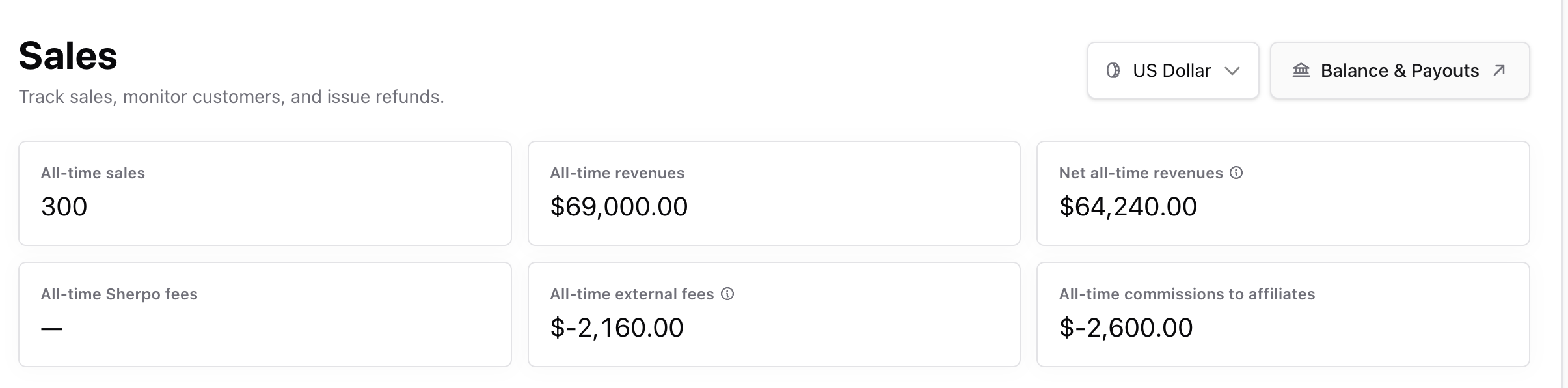
For the selected product, you’ll see:
* **All-time sales** — Total number of completed transactions.
* **All-time revenues** — Total gross sales.
* **Net all-time revenues** — Gross minus Sherpo and external (Stripe) fees.
* **Sherpo fees** — Platform fees (0–5%, depending on plan).
* **External fees** — Stripe payment processing fees.
* **Affiliate commissions** — Amount owed to partners.
You can also jump to your **global Sales dashboard** via the quick link in the header.
### Date range & AI insights
Filter data by date range or use built-in presets (last 7 days, last 30 days, month-to-date). The dashboard URL automatically updates with your selected range for easy sharing or bookmarking.
### Metrics
For the selected product, you’ll see:
* **All-time sales** — Total number of completed transactions.
* **All-time revenues** — Total gross sales.
* **Net all-time revenues** — Gross minus Sherpo and external (Stripe) fees.
* **Sherpo fees** — Platform fees (0–5%, depending on plan).
* **External fees** — Stripe payment processing fees.
* **Affiliate commissions** — Amount owed to partners.
You can also jump to your **global Sales dashboard** via the quick link in the header.
### Date range & AI insights
Filter data by date range or use built-in presets (last 7 days, last 30 days, month-to-date). The dashboard URL automatically updates with your selected range for easy sharing or bookmarking.
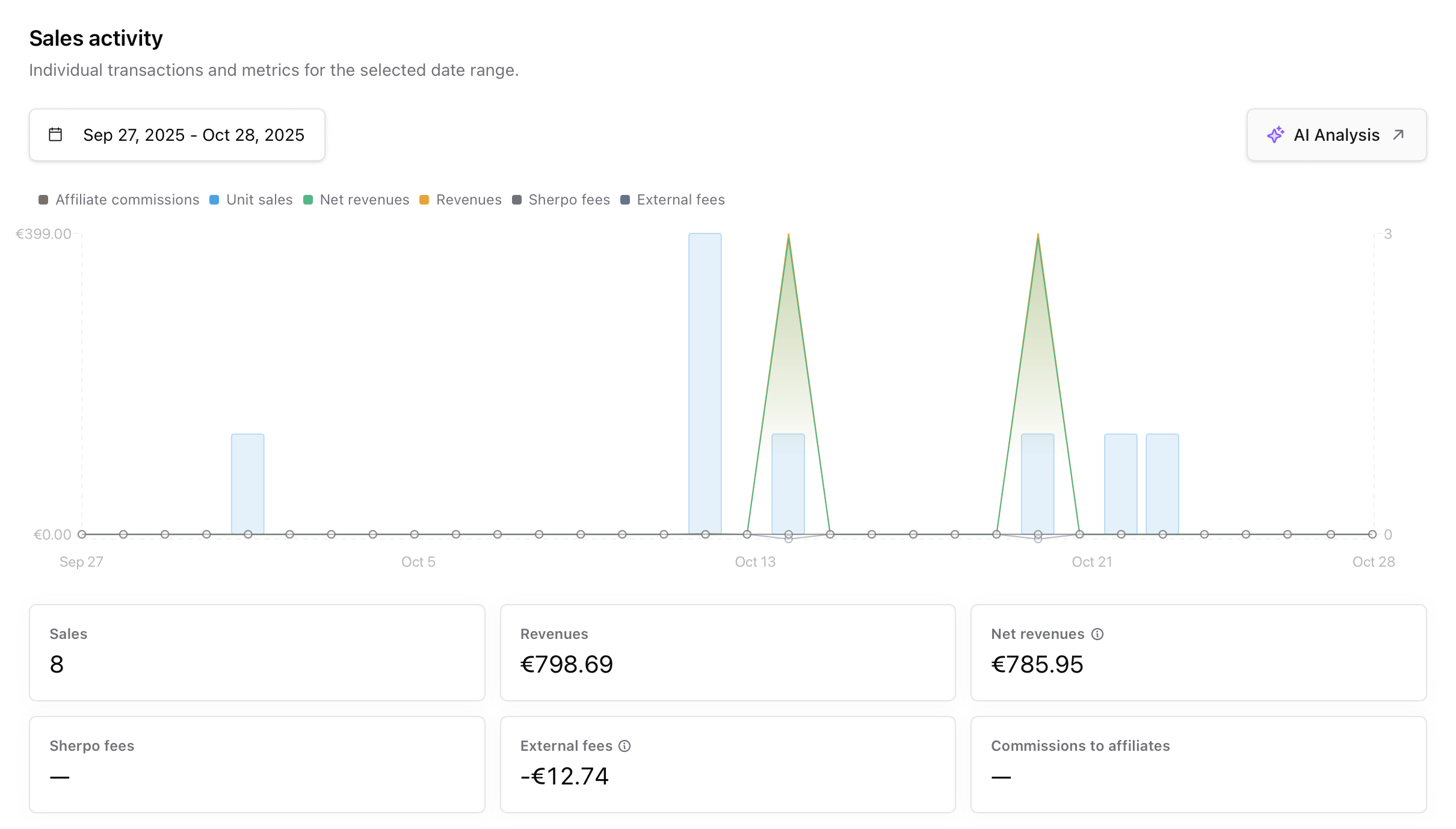 Use the **AI Analysis** button (✨) to send filtered data to Sherpo AI. It can help you summarize trends, campaign results, or conversion performance instantly, perfect for quick reporting or stakeholder updates.
### Transactions table
Scroll below the chart to find your complete transaction log.
Use the **AI Analysis** button (✨) to send filtered data to Sherpo AI. It can help you summarize trends, campaign results, or conversion performance instantly, perfect for quick reporting or stakeholder updates.
### Transactions table
Scroll below the chart to find your complete transaction log.
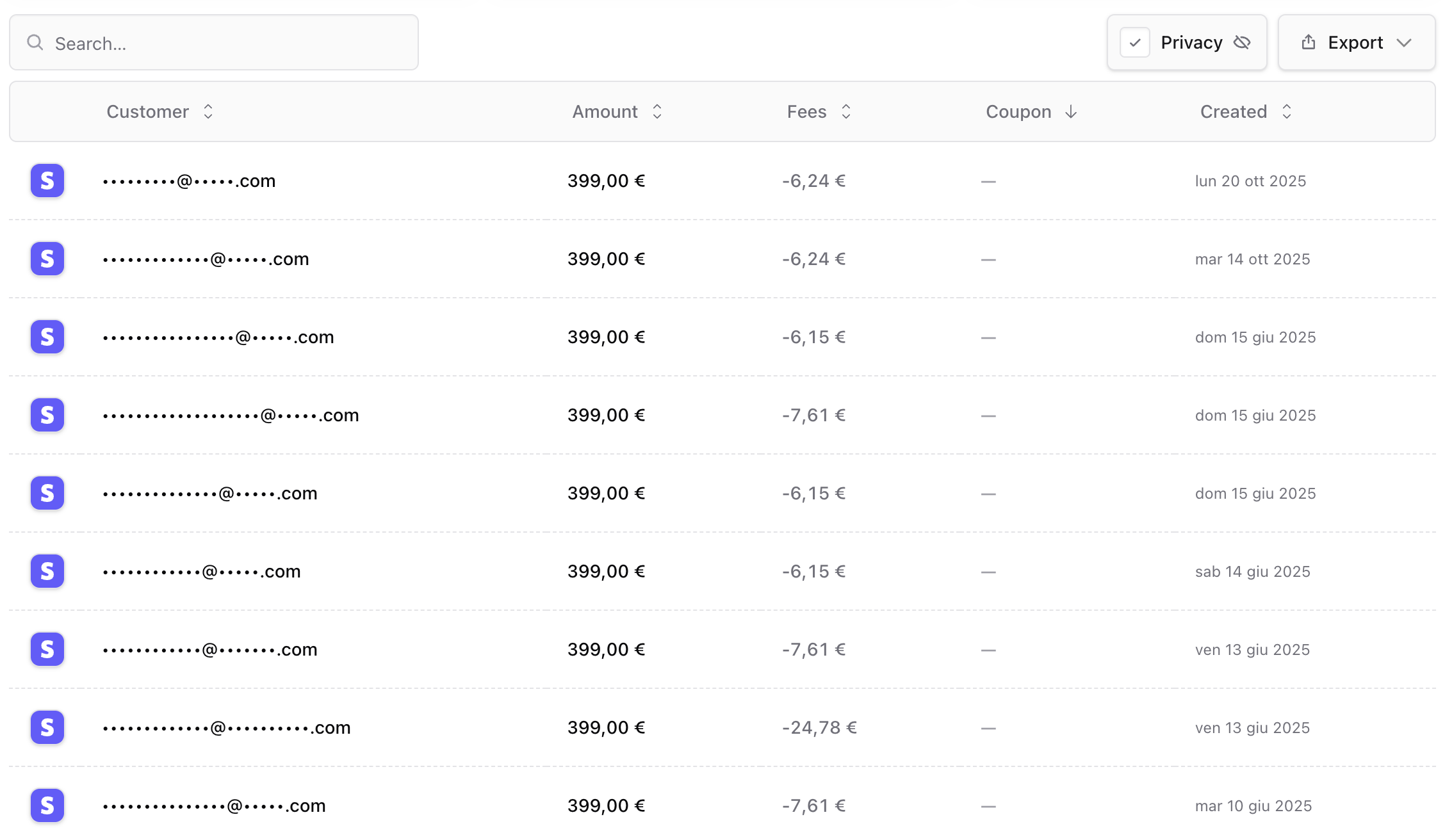 Each row includes:
* **Customer** email (which can be hidden for Privacy purposes, e.g., if you're recording the screen or creating docs for Sherpo!)
* **Amount** and **currency**
* **Fees** (Sherpo + payment)
* **Coupon** used (if any)
* **Created date** and **status**
Click any row to open **Stripe’s Connect Payment Details** overlay, where you can issue refunds, view card info, or inspect risk signals.
You can also **export transactions** in CSV, Markdown, or JSON format for accounting or analytics workflows.
***
## FAQ
Yes. Price changes propagate instantly across your site and checkout links. If you want to pause a promotion before changing pricing, disable active coupons first.
During a price update, Sherpo prompts you to choose how existing coupons behave: **Keep**, **Disable**, or **Delete**. Keeping them means they’ll continue applying based on their existing rules.
Yes, though Sherpo currently supports a limited number of currencies. If you require an unsupported one, contact [support@sherpo.io](mailto:support@sherpo.io).
Refunds are handled through Stripe. Click any transaction row in the **Sales** tab to open Stripe’s details view, where you can issue partial or full refunds.
Sales and revenue metrics refresh in real time after every successful transaction.
* **Sherpo fees** — Platform commission, based on your plan (0–5%).
* **External fees** — Stripe’s card processing and payment network costs.
Yes. You can export sales per product or globally from the main **Sales** dashboard.
Each row includes:
* **Customer** email (which can be hidden for Privacy purposes, e.g., if you're recording the screen or creating docs for Sherpo!)
* **Amount** and **currency**
* **Fees** (Sherpo + payment)
* **Coupon** used (if any)
* **Created date** and **status**
Click any row to open **Stripe’s Connect Payment Details** overlay, where you can issue refunds, view card info, or inspect risk signals.
You can also **export transactions** in CSV, Markdown, or JSON format for accounting or analytics workflows.
***
## FAQ
Yes. Price changes propagate instantly across your site and checkout links. If you want to pause a promotion before changing pricing, disable active coupons first.
During a price update, Sherpo prompts you to choose how existing coupons behave: **Keep**, **Disable**, or **Delete**. Keeping them means they’ll continue applying based on their existing rules.
Yes, though Sherpo currently supports a limited number of currencies. If you require an unsupported one, contact [support@sherpo.io](mailto:support@sherpo.io).
Refunds are handled through Stripe. Click any transaction row in the **Sales** tab to open Stripe’s details view, where you can issue partial or full refunds.
Sales and revenue metrics refresh in real time after every successful transaction.
* **Sherpo fees** — Platform commission, based on your plan (0–5%).
* **External fees** — Stripe’s card processing and payment network costs.
Yes. You can export sales per product or globally from the main **Sales** dashboard.