> ## Documentation Index
> Fetch the complete documentation index at: https://docs.sherpo.io/llms.txt
> Use this file to discover all available pages before exploring further.
# Goals
> Run fundraising campaigns with real-time progress bars.
The **Goals** product lets you collect one-off contributions toward a target amount. It’s ideal for fundraisers, equipment drives, creative projects, or community milestones. Each supporter’s purchase contributes to your live progress bar, and contributors receive automated receipts just like any other Sherpo checkout.
With **Goals**, Sherpo makes fundraising and community support effortless: real-time progress bars, secure payments, automatic receipts, and full control under your brand.
If you're looking for a guide on how **Goals** products work for users, you can find it here:
Let your customers support your fundraising campaigns.
***
## Create a Goals product
1. Go to **Products → New product**.
2. Enter a title and short description.
3. Select the **Goals** tile (hand icon).
4. Click **Create product** to open the workspace.
5. In **Prices**, set both the **goal amount** and **minimum contribution** to publish.
From here, use the **Basic info** tab to describe your campaign, outline deliverables, or spotlight supporters as you progress.
For a guide to the product’s Overview and Settings tabs, check this out:
Edit your product’s info, description, and settings from the dashboard.
***
### Update goal or price
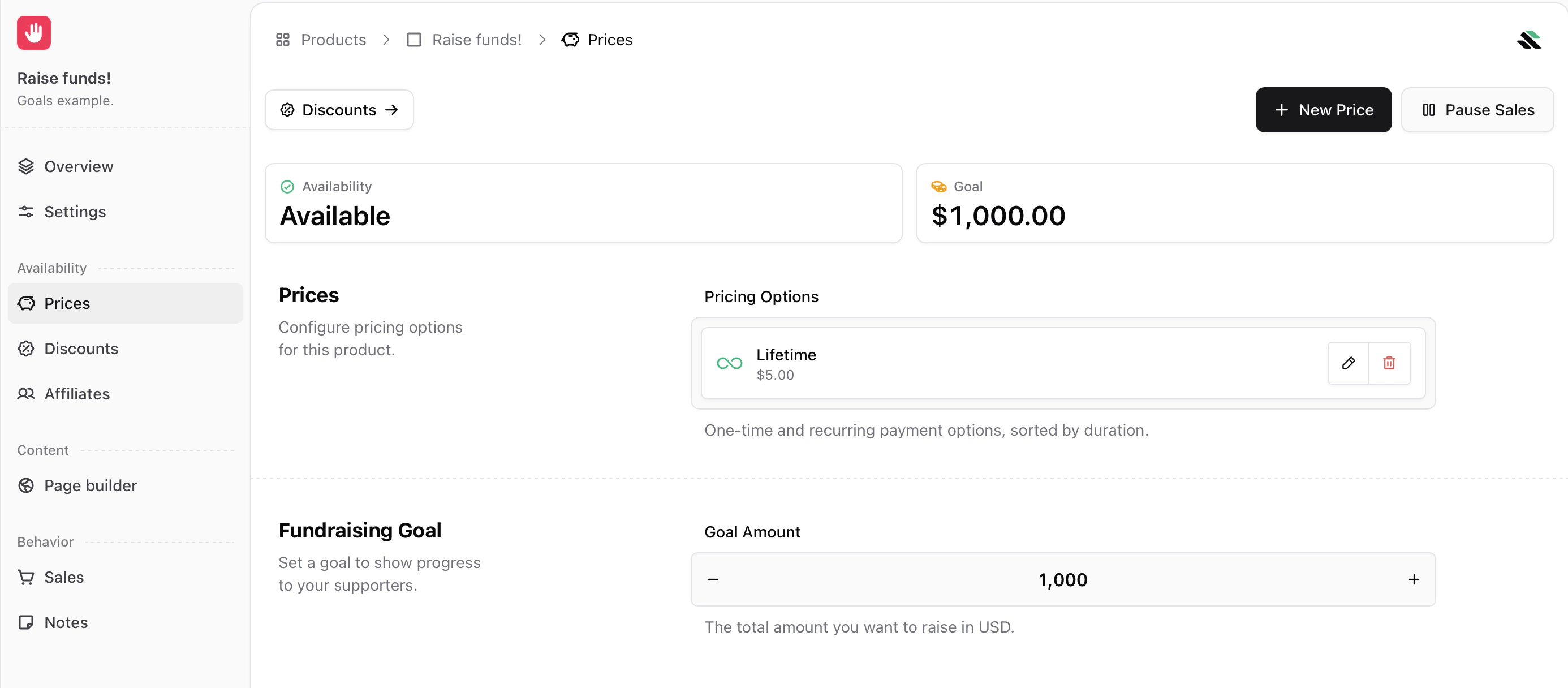 Under **Prices**, define the lowest allowed contribution amount (minimum \$5). Sherpo automatically offers quick-select multipliers (×1, ×3, ×5, ×10) plus custom entry. You can edit pricing and targets at any time from the same panel.
Once updated, Sherpo immediately applies the new amount across your storefront.
**Note:** Supporters can still contribute even after you reach the target.
### Configure your goal amount
Under **Fundraising Goal**, you can manually set or edit the fundraising target. This defines the endpoint of the progress bar.
***
## Goal tracking
Visitors see the goal bar and current progress directly on your live page. It updates automatically as payments settle, showing progress in real time.
Under **Prices**, define the lowest allowed contribution amount (minimum \$5). Sherpo automatically offers quick-select multipliers (×1, ×3, ×5, ×10) plus custom entry. You can edit pricing and targets at any time from the same panel.
Once updated, Sherpo immediately applies the new amount across your storefront.
**Note:** Supporters can still contribute even after you reach the target.
### Configure your goal amount
Under **Fundraising Goal**, you can manually set or edit the fundraising target. This defines the endpoint of the progress bar.
***
## Goal tracking
Visitors see the goal bar and current progress directly on your live page. It updates automatically as payments settle, showing progress in real time.
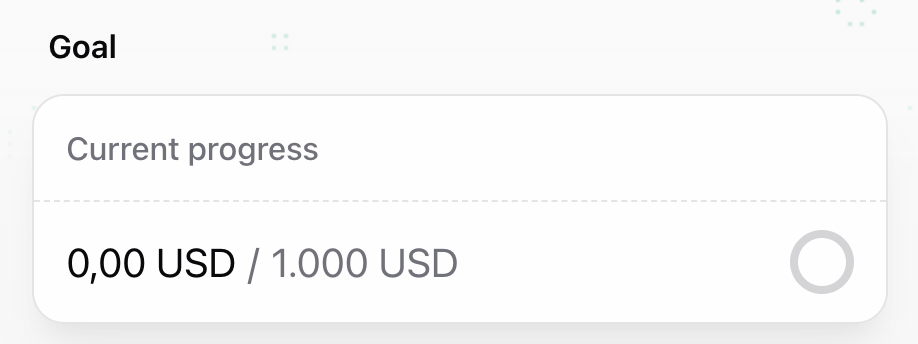 * Each completed payment increases the total raised.
* Contributors can leave a **name** and **note** during checkout.
* Receipts and notifications are handled automatically by Sherpo.
***
## Track results
The product’s **Sales** tab lists every supporter and the total amount raised. You can export transactions as CSV, JSON, or Markdown to thank supporters, deliver perks, or share updates.
Sherpo’s real-time progress syncing means no manual refreshes or third-party integrations. Everything updates automatically as sales settle.
***
## Build your Goals product page
Under **Page Builder**, you can fully customize how your Goals product page looks using Sherpo's powerful, lego-like builder.
### Goals-specific blocks
Inside the Goals Page Builder, you will see a **Get** block alongside the **Pages** and **Content** blocks. Like in every other Sherpo product, these blocks are mandatory and cannot be deleted or hidden. If not populated, they will simply not render. For Goals products, **Get** also contains the product-specific contribution interface, where users can select their contribution amount as a multiple of your minimum amount, add their name, write a message, and leave their email.
* Each completed payment increases the total raised.
* Contributors can leave a **name** and **note** during checkout.
* Receipts and notifications are handled automatically by Sherpo.
***
## Track results
The product’s **Sales** tab lists every supporter and the total amount raised. You can export transactions as CSV, JSON, or Markdown to thank supporters, deliver perks, or share updates.
Sherpo’s real-time progress syncing means no manual refreshes or third-party integrations. Everything updates automatically as sales settle.
***
## Build your Goals product page
Under **Page Builder**, you can fully customize how your Goals product page looks using Sherpo's powerful, lego-like builder.
### Goals-specific blocks
Inside the Goals Page Builder, you will see a **Get** block alongside the **Pages** and **Content** blocks. Like in every other Sherpo product, these blocks are mandatory and cannot be deleted or hidden. If not populated, they will simply not render. For Goals products, **Get** also contains the product-specific contribution interface, where users can select their contribution amount as a multiple of your minimum amount, add their name, write a message, and leave their email.
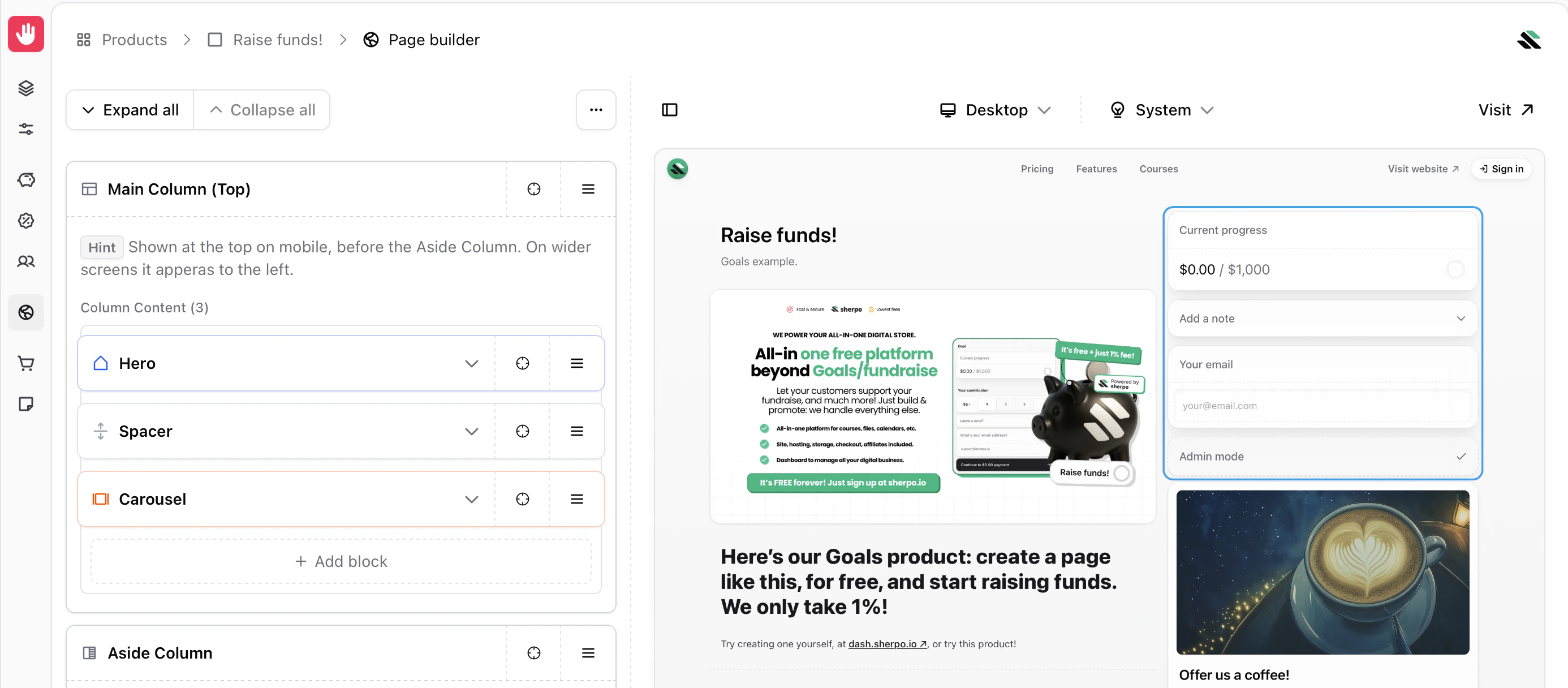 All of this is included by default in the **Aside Column**, which displays the blocks on the right. You are free to remove them from the column and position them wherever you prefer. Sherpo simply ensures that all mandatory blocks are present before allowing you to update the page.
### Product-specific blocks
All product Page Builders include an additional **Product** block category. These blocks are specific to the product type and power the core functionality of the page.
All of this is included by default in the **Aside Column**, which displays the blocks on the right. You are free to remove them from the column and position them wherever you prefer. Sherpo simply ensures that all mandatory blocks are present before allowing you to update the page.
### Product-specific blocks
All product Page Builders include an additional **Product** block category. These blocks are specific to the product type and power the core functionality of the page.
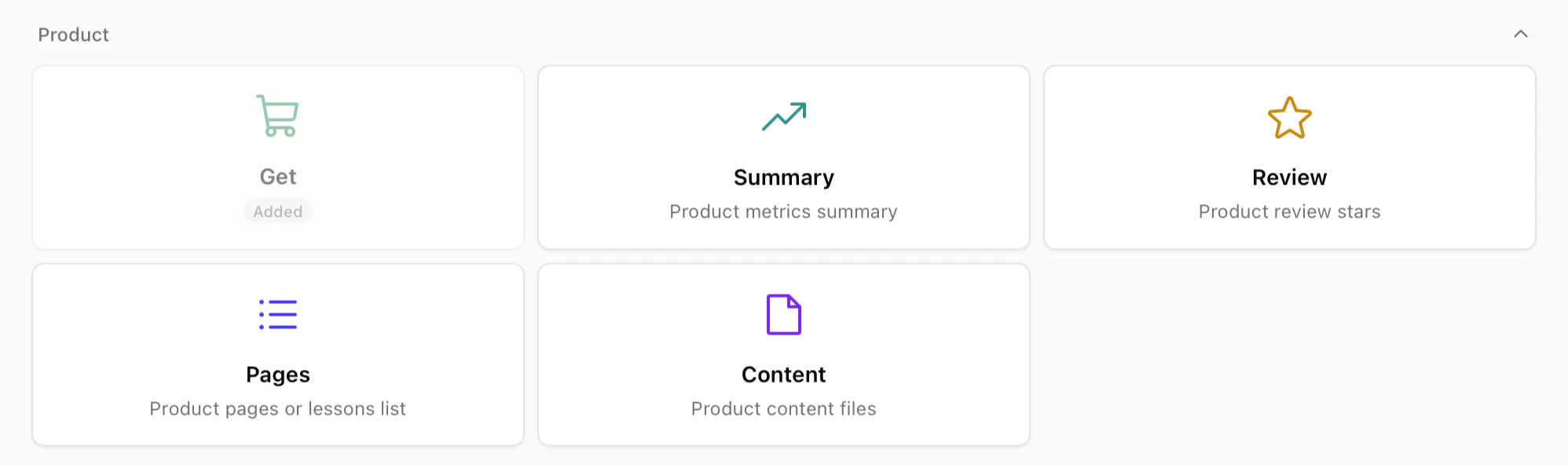 These blocks usually include:
* **Get** — The purchase or unlock interface for the product.
* **Summary** — A compact overview of product metrics or highlights.
* **Review** — Displays review ratings and feedback from customers.
* **Pages** — Lists internal pages such as lessons, episodes, or product sections.
* **Content** — Displays the files or content included in the product.
Like other mandatory blocks, some of these may already be included in your layout and cannot be deleted, but you are free to move them anywhere within your page.
### Page builder
The rest of the Page Builder behaves exactly like the Site Builder. If you want to discover more about our blocks and building pages, check this out.
Build and customize your page by stacking and composing blocks. Powerful under the hood, simple to use.
***
## Fulfillment & receipts
Coffee is a **support-only** product. It does not unlock content or files. After each transaction:
* The supporter receives an automatic **email receipt**.
* Funds are transferred to your **connected Stripe account**.
You can track all transactions under **Sales** and export them as CSV, JSON, or Markdown.
***
## Best practices
* Use visuals or reward milestones, for example, “We’ll release behind-the-scenes footage when we reach \$500.”
* Update your audience frequently by including a product’s **Description** with a **Markdown** block to: share milestones or next steps once the goal is reached
* If you exceed your goal, you can keep the campaign open. Sherpo allows continued contributions beyond 100%, and you can always update the goal.
***
## FAQ
The Goals Page Builder works exactly like the Site Builder. You can stack, reorder, and customize blocks to design your product page. Mandatory blocks such as "Get", "Pages", and "Content" cannot be removed, but you can position them anywhere within your layout. If a mandatory block is empty, it will not render on the live page.
Yes. Sherpo’s checkout includes preset multipliers (×3, ×5, ×10) and allows custom input so supporters can contribute any amount above the minimum.
The progress bar fills completely, but supporters can continue contributing. You can update the goal if you decide to extend the campaign or archive the product.
Yes. You can update it anytime from **Prices → Update goal**. Changes may take a few minutes to propagate across your storefront.
Absolutely. Click **Update price** to change the minimum contribution or currency. Sherpo currently supports a limited set of currencies. Contact support if you need one that is not listed.
Yes. Contributions cannot be lower than **\$5** per transaction for security and compliance reasons.
Sherpo sums all successful transactions for that product and divides the total by your set goal amount. Refunds automatically reduce the progress total.
Yes. Every contribution triggers Sherpo’s standard checkout confirmation and email receipt through your Stripe account.
You can see all supporters and their emails in **Sales**. Export this list for updates, rewards, or follow-ups.
No. Unlike other Sherpo products, **Goals**, along with **Coffee** and **Calendar**, does not support coupon creation.
No. Goals products do not support automations or triggers.
No. Contributions made through **Goals** are real payments, not pledges. Funds are captured immediately and transferred to your Stripe account like any other Sherpo product. Creators are not required to return funds if the goal is not reached.
You can archive (pause or unpublish) or delete it anytime from the product dashboard under **Settings**.
These blocks usually include:
* **Get** — The purchase or unlock interface for the product.
* **Summary** — A compact overview of product metrics or highlights.
* **Review** — Displays review ratings and feedback from customers.
* **Pages** — Lists internal pages such as lessons, episodes, or product sections.
* **Content** — Displays the files or content included in the product.
Like other mandatory blocks, some of these may already be included in your layout and cannot be deleted, but you are free to move them anywhere within your page.
### Page builder
The rest of the Page Builder behaves exactly like the Site Builder. If you want to discover more about our blocks and building pages, check this out.
Build and customize your page by stacking and composing blocks. Powerful under the hood, simple to use.
***
## Fulfillment & receipts
Coffee is a **support-only** product. It does not unlock content or files. After each transaction:
* The supporter receives an automatic **email receipt**.
* Funds are transferred to your **connected Stripe account**.
You can track all transactions under **Sales** and export them as CSV, JSON, or Markdown.
***
## Best practices
* Use visuals or reward milestones, for example, “We’ll release behind-the-scenes footage when we reach \$500.”
* Update your audience frequently by including a product’s **Description** with a **Markdown** block to: share milestones or next steps once the goal is reached
* If you exceed your goal, you can keep the campaign open. Sherpo allows continued contributions beyond 100%, and you can always update the goal.
***
## FAQ
The Goals Page Builder works exactly like the Site Builder. You can stack, reorder, and customize blocks to design your product page. Mandatory blocks such as "Get", "Pages", and "Content" cannot be removed, but you can position them anywhere within your layout. If a mandatory block is empty, it will not render on the live page.
Yes. Sherpo’s checkout includes preset multipliers (×3, ×5, ×10) and allows custom input so supporters can contribute any amount above the minimum.
The progress bar fills completely, but supporters can continue contributing. You can update the goal if you decide to extend the campaign or archive the product.
Yes. You can update it anytime from **Prices → Update goal**. Changes may take a few minutes to propagate across your storefront.
Absolutely. Click **Update price** to change the minimum contribution or currency. Sherpo currently supports a limited set of currencies. Contact support if you need one that is not listed.
Yes. Contributions cannot be lower than **\$5** per transaction for security and compliance reasons.
Sherpo sums all successful transactions for that product and divides the total by your set goal amount. Refunds automatically reduce the progress total.
Yes. Every contribution triggers Sherpo’s standard checkout confirmation and email receipt through your Stripe account.
You can see all supporters and their emails in **Sales**. Export this list for updates, rewards, or follow-ups.
No. Unlike other Sherpo products, **Goals**, along with **Coffee** and **Calendar**, does not support coupon creation.
No. Goals products do not support automations or triggers.
No. Contributions made through **Goals** are real payments, not pledges. Funds are captured immediately and transferred to your Stripe account like any other Sherpo product. Creators are not required to return funds if the goal is not reached.
You can archive (pause or unpublish) or delete it anytime from the product dashboard under **Settings**.