> ## Documentation Index
> Fetch the complete documentation index at: https://docs.sherpo.io/llms.txt
> Use this file to discover all available pages before exploring further.
# Reviews
> Set up reviews and collect customer feedback directly on your Sherpo products.
Sherpo’s review system lets you gather verified customer feedback right inside your dashboard, with no third-party tools or integrations required.
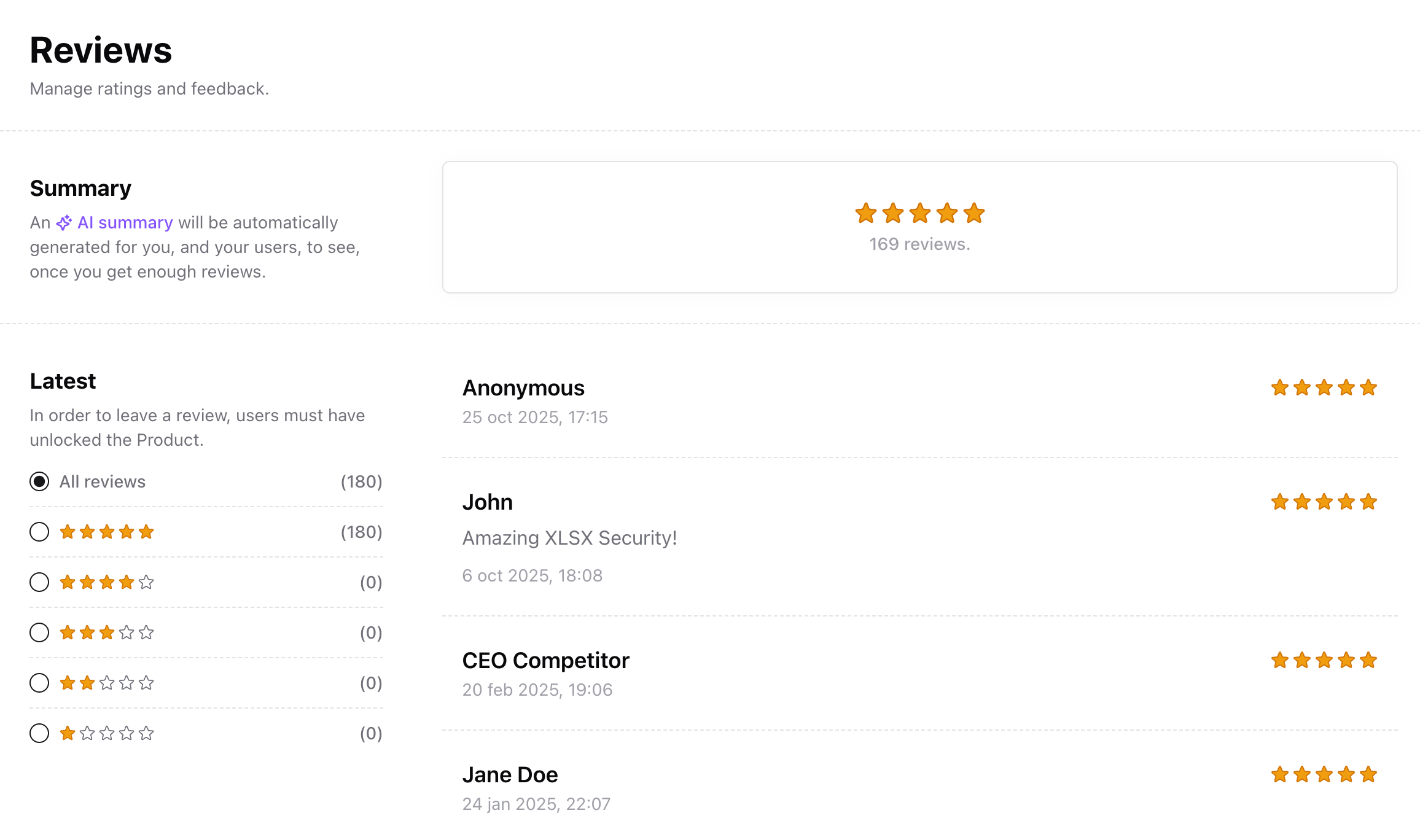 Buyers can rate your products and leave short notes after unlocking them. You’ll see every review in your dashboard, automatically organized by product.
In this guide we see how to set up reviews from the Dashboard. If you are looking for a guide about how reviews work from the user's side, check out this:
Let your customers leave reviews to your products.
***
## How reviews work
* Reviews are available for most product types, including **Courses** and **Files**.
* Customers can leave a **1–5 star rating** and optionally add their name and/or a short written comment.
* Each review is tied to the corresponding order, so you always know **who left it** and **when**.
* Written reviews are public by default, reviews with no comments are hidden by default. You can always hide and unhide reviews, from your Dashboard.
***
## Enable or disable reviews
Reviews are enabled by default. To turn them off for a specific product:
1. Go to **Products → \[Product] → Settings**.
2. Toggle **Hide reviews**.
* When disabled, customers won’t be able to submit new reviews.
Buyers can rate your products and leave short notes after unlocking them. You’ll see every review in your dashboard, automatically organized by product.
In this guide we see how to set up reviews from the Dashboard. If you are looking for a guide about how reviews work from the user's side, check out this:
Let your customers leave reviews to your products.
***
## How reviews work
* Reviews are available for most product types, including **Courses** and **Files**.
* Customers can leave a **1–5 star rating** and optionally add their name and/or a short written comment.
* Each review is tied to the corresponding order, so you always know **who left it** and **when**.
* Written reviews are public by default, reviews with no comments are hidden by default. You can always hide and unhide reviews, from your Dashboard.
***
## Enable or disable reviews
Reviews are enabled by default. To turn them off for a specific product:
1. Go to **Products → \[Product] → Settings**.
2. Toggle **Hide reviews**.
* When disabled, customers won’t be able to submit new reviews.
 3. Click **Save**: changes apply immediately.
***
## Export & report
You can export reviews for deeper analysis or reporting:
* Open **Sales → Reviews**, then click **Export**.
* Sherpo generates a CSV containing:
* Rating
* Comment
* Customer name and email
* Submission timestamp
You can filter by rating or date before exporting, and analyze the file in your BI tool or spreadsheet.
***
## Best practices
* **Follow up:** Encourage buyers to share feedback after purchase.
* **Identify themes:** Pay attention to recurring phrases in 4–5 star reviews to see what customers value most.
* **Respond quickly to low scores:** Use reviews as a customer support signal and reach out privately to resolve issues, if any.
* **Gather testimonials:** Showcase your best reviews in your product page or on your socials.
***
## FAQ
Yes. Go to **Products → \[Product] → Settings → Hide reviews**, then save your changes.
Yes. You can create automations that run when a new review is submitted or updated, for example, sending a custom coupon or granting a reward.
Yes. Use the **Export** button in **Sales → Reviews** to download a CSV of all reviews, including rating, comment, and customer info.
Existing reviews remain visible in your dashboard but customers won’t be able to submit new ones.
Yes, you can decide whether to show a certain review or not. Reviews with no comments are hidden by default, but can be unhidden.
No. However, each review is linked to an order and customer email, so you can follow up manually if needed.
3. Click **Save**: changes apply immediately.
***
## Export & report
You can export reviews for deeper analysis or reporting:
* Open **Sales → Reviews**, then click **Export**.
* Sherpo generates a CSV containing:
* Rating
* Comment
* Customer name and email
* Submission timestamp
You can filter by rating or date before exporting, and analyze the file in your BI tool or spreadsheet.
***
## Best practices
* **Follow up:** Encourage buyers to share feedback after purchase.
* **Identify themes:** Pay attention to recurring phrases in 4–5 star reviews to see what customers value most.
* **Respond quickly to low scores:** Use reviews as a customer support signal and reach out privately to resolve issues, if any.
* **Gather testimonials:** Showcase your best reviews in your product page or on your socials.
***
## FAQ
Yes. Go to **Products → \[Product] → Settings → Hide reviews**, then save your changes.
Yes. You can create automations that run when a new review is submitted or updated, for example, sending a custom coupon or granting a reward.
Yes. Use the **Export** button in **Sales → Reviews** to download a CSV of all reviews, including rating, comment, and customer info.
Existing reviews remain visible in your dashboard but customers won’t be able to submit new ones.
Yes, you can decide whether to show a certain review or not. Reviews with no comments are hidden by default, but can be unhidden.
No. However, each review is linked to an order and customer email, so you can follow up manually if needed.