> ## Documentation Index
> Fetch the complete documentation index at: https://docs.sherpo.io/llms.txt
> Use this file to discover all available pages before exploring further.
# Sales & Customers
> Track revenue, refunds, customer cohorts, and AI insights from Sherpo's Sales and Customers dashboards.
Sherpo’s **Sales** and **Customers** dashboards centralize performance analytics so you can understand your business without leaving the app. The **Sales** page tracks revenue, fees, and payouts, while the **Customers** page highlights buyer geography, cohorts, and lifetime value.
Both pages share the same date-range filters, currency selector, and AI-powered analysis tools.
***
## Sales page
 ### Header metrics
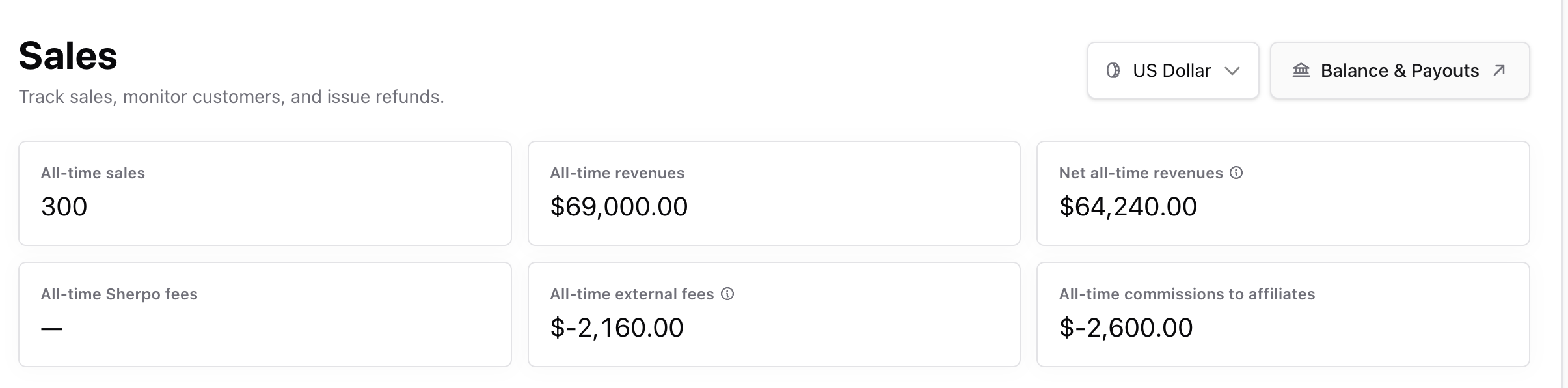
At the top, you’ll see **cumulative stats per currency**:
* **All-time sales** — Number of completed transactions.
* **All-time revenues** — Total gross sales.
* **Net all-time revenues** — Gross minus Sherpo and Stripe fees.
* **Sherpo fees** — Platform commissions (0–5%, depending on your plan).
* **External fees** — Payment processor costs (e.g., Stripe).
* **Affiliate commissions** — Total payout amounts (if applicable).
Switch currencies from the dropdown to review sales in different denominations.\
Click **Balance & Payouts** to open your connected Stripe dashboard for live payouts and balances.
### Date range & filters
### Header metrics
At the top, you’ll see **cumulative stats per currency**:
* **All-time sales** — Number of completed transactions.
* **All-time revenues** — Total gross sales.
* **Net all-time revenues** — Gross minus Sherpo and Stripe fees.
* **Sherpo fees** — Platform commissions (0–5%, depending on your plan).
* **External fees** — Payment processor costs (e.g., Stripe).
* **Affiliate commissions** — Total payout amounts (if applicable).
Switch currencies from the dropdown to review sales in different denominations.\
Click **Balance & Payouts** to open your connected Stripe dashboard for live payouts and balances.
### Date range & filters
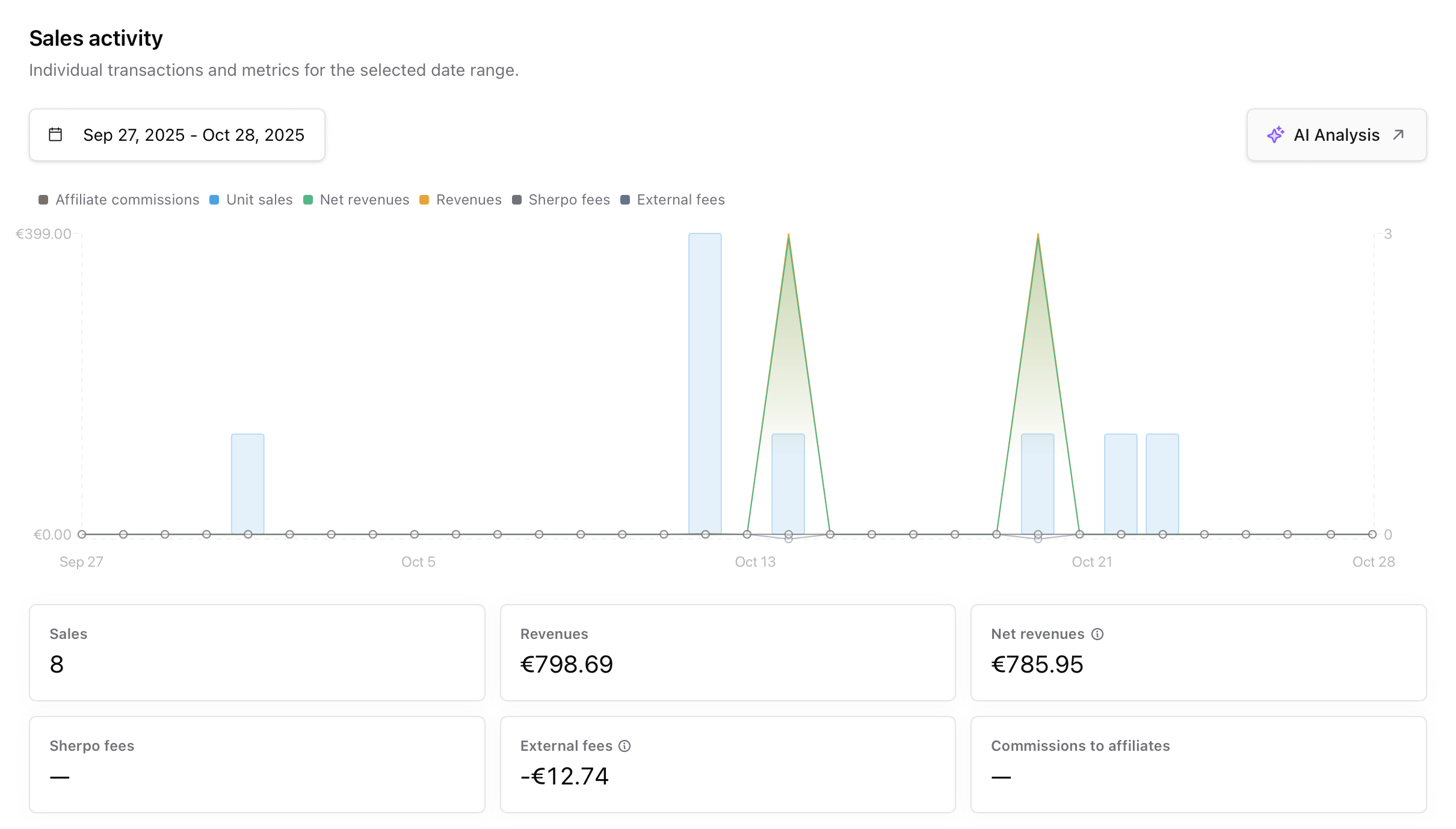 * Use preset filters (7 days, 30 days, MTD, custom) to adjust charts and tables.
* All filters persist in the page URL, so you can share or bookmark exact views.
* The **AI Analysis** button (✨) exports filtered data and opens a chat with Sherpo AI—perfect for questions like:
> “What was my average order size this month?”\
> “Summarize sales growth compared to last quarter.”
### Transactions table
* Use preset filters (7 days, 30 days, MTD, custom) to adjust charts and tables.
* All filters persist in the page URL, so you can share or bookmark exact views.
* The **AI Analysis** button (✨) exports filtered data and opens a chat with Sherpo AI—perfect for questions like:
> “What was my average order size this month?”\
> “Summarize sales growth compared to last quarter.”
### Transactions table
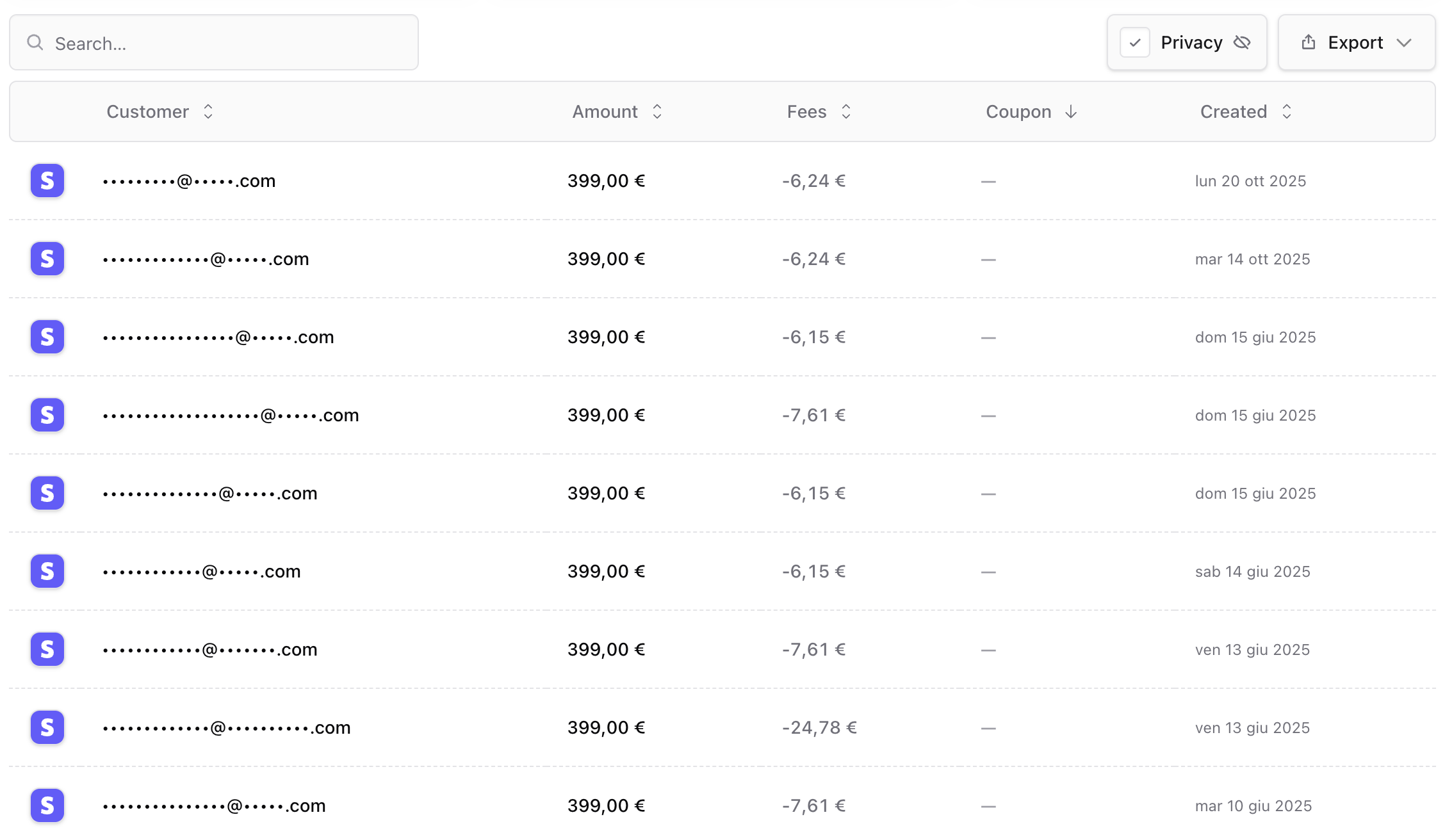 Each transaction includes:
* **Customer** email
* **Amount** and **currency**
* **Sherpo** and **external fees**
* **Coupon** used
* **Date created**
Click any row to open **Stripe Connect Payment Details**, where you can view payment metadata, issue refunds, or check risk indicators.
Export filtered results as **CSV**, **Markdown**, or **JSON** for accounting or BI tools.
***
## Customers page
Each transaction includes:
* **Customer** email
* **Amount** and **currency**
* **Sherpo** and **external fees**
* **Coupon** used
* **Date created**
Click any row to open **Stripe Connect Payment Details**, where you can view payment metadata, issue refunds, or check risk indicators.
Export filtered results as **CSV**, **Markdown**, or **JSON** for accounting or BI tools.
***
## Customers page
 ### Header metrics
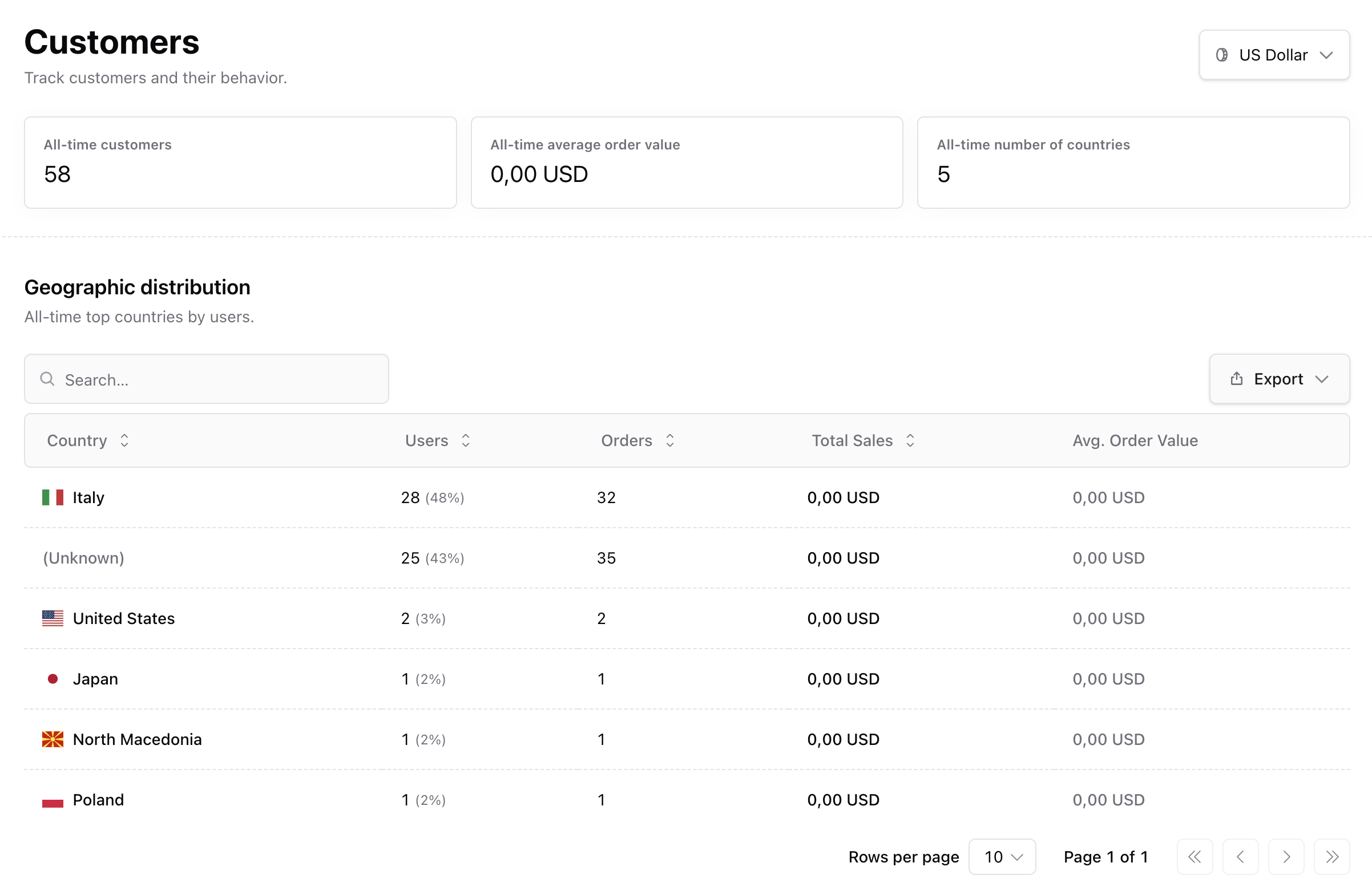
The **Customers** page aggregates user behavior and distribution data:
* **All-time customers** — Unique buyer emails.
* **Average order value** — Lifetime AOV based on all transactions.
* **Number of countries** — Total distinct billing countries.
You can switch currencies to recalculate values instantly.
### Geographic distribution
See where your customers come from with a sortable table and percentage breakdowns. Columns include **country**, **user count**, **orders**, **total sales**, and **average order value**. This helps you identify key markets, localize checkout experiences, and plan targeted campaigns.
### Customer activity
### Header metrics
The **Customers** page aggregates user behavior and distribution data:
* **All-time customers** — Unique buyer emails.
* **Average order value** — Lifetime AOV based on all transactions.
* **Number of countries** — Total distinct billing countries.
You can switch currencies to recalculate values instantly.
### Geographic distribution
See where your customers come from with a sortable table and percentage breakdowns. Columns include **country**, **user count**, **orders**, **total sales**, and **average order value**. This helps you identify key markets, localize checkout experiences, and plan targeted campaigns.
### Customer activity
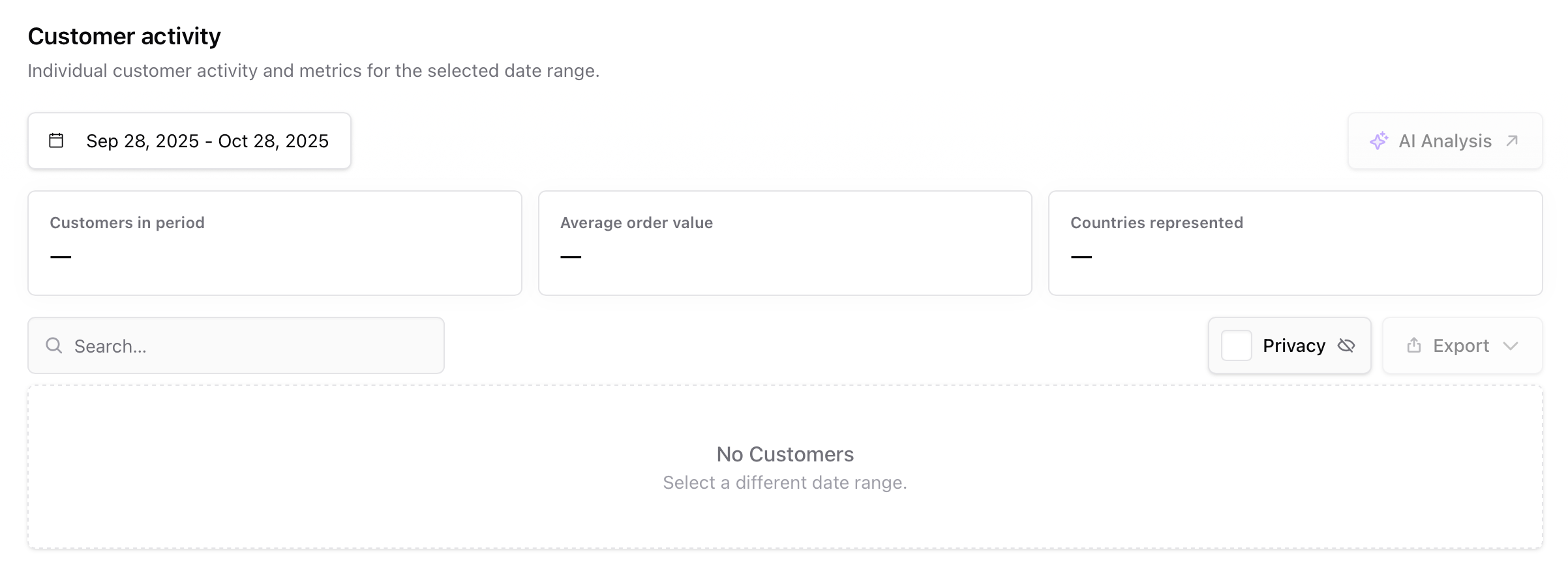 Filter by date range to analyze new versus returning customers, or review cohort performance after a campaign. Top metrics include:
* **Customers in period**
* **Average order value**
* **Countries represented**
You can also use **AI Analysis** to summarize trends automatically — for example:
> “Which countries drove the most new buyers last month?”\
> “Who are my top five repeat customers?”
***
## Shared features
* **Date range presets** — The same range picker applies across both dashboards and syncs in the URL.
* **Exports** — All tables can be exported in **CSV**, **Markdown**, or **JSON** formats.
* **AI conversations** — Each AI Analysis opens inside your AI workspace, where results are saved for reference.
* **Privacy & permissions** — Only authorized organization members can view sales and customer data; customers never see this information.
***
## FAQ
All metrics and tables update in real time after every successful transaction. If you refund or delete a payment in Stripe, Sherpo automatically reflects the change.
If you’re on the **Ultra** plan, Sherpo charges no platform fees. You may also see dashes if data is filtered by a range with no transactions.
Yes. Click any transaction in the Sales table to open **Stripe Payment Details**—from there, you can issue partial or full refunds.
Absolutely. Open the **Customers** page and search by email to see that customer’s total orders, countries, and spend.
Sherpo divides total revenue (gross or net, depending on filter) by the number of completed orders within the date range.
This occurs when the billing country isn’t provided by Stripe. It doesn’t affect reporting accuracy: only location-based segmentation.
Sales metrics aggregate across your entire organization. For product-specific breakdowns, open the **Product → Sales** tab instead.
Every AI analysis is stored under your **Sherpo AI** workspace, where you can revisit, rename, or export conversations anytime.
Currently, exports are separate—Sales and Customers each export their own data. You can merge them externally using your preferred BI or spreadsheet tool.
Sherpo reports values based on the selected currency. If you sell products in multiple currencies, switch using the top dropdown to view localized totals.
Filter by date range to analyze new versus returning customers, or review cohort performance after a campaign. Top metrics include:
* **Customers in period**
* **Average order value**
* **Countries represented**
You can also use **AI Analysis** to summarize trends automatically — for example:
> “Which countries drove the most new buyers last month?”\
> “Who are my top five repeat customers?”
***
## Shared features
* **Date range presets** — The same range picker applies across both dashboards and syncs in the URL.
* **Exports** — All tables can be exported in **CSV**, **Markdown**, or **JSON** formats.
* **AI conversations** — Each AI Analysis opens inside your AI workspace, where results are saved for reference.
* **Privacy & permissions** — Only authorized organization members can view sales and customer data; customers never see this information.
***
## FAQ
All metrics and tables update in real time after every successful transaction. If you refund or delete a payment in Stripe, Sherpo automatically reflects the change.
If you’re on the **Ultra** plan, Sherpo charges no platform fees. You may also see dashes if data is filtered by a range with no transactions.
Yes. Click any transaction in the Sales table to open **Stripe Payment Details**—from there, you can issue partial or full refunds.
Absolutely. Open the **Customers** page and search by email to see that customer’s total orders, countries, and spend.
Sherpo divides total revenue (gross or net, depending on filter) by the number of completed orders within the date range.
This occurs when the billing country isn’t provided by Stripe. It doesn’t affect reporting accuracy: only location-based segmentation.
Sales metrics aggregate across your entire organization. For product-specific breakdowns, open the **Product → Sales** tab instead.
Every AI analysis is stored under your **Sherpo AI** workspace, where you can revisit, rename, or export conversations anytime.
Currently, exports are separate—Sales and Customers each export their own data. You can merge them externally using your preferred BI or spreadsheet tool.
Sherpo reports values based on the selected currency. If you sell products in multiple currencies, switch using the top dropdown to view localized totals.