> ## Documentation Index
> Fetch the complete documentation index at: https://docs.sherpo.io/llms.txt
> Use this file to discover all available pages before exploring further.
# Coffees
> Collect one-off support payments or buy me a coffee tips with Sherpo's coffee product.
**Coffee** products give your audience a lightweight way to support your work. Think of them as **branded tip jars**: you set a minimum price, describe what contributions help fund, and Sherpo handles checkout, receipts, and payouts through Stripe Connect.
With Coffee, supporters can quickly send you a small token of appreciation: a coffee, a tip, or a thank-you, directly through your Sherpo site.
If you're looking for a guide about how to **create** Coffee products and change emojis, you can find it here:
Let your audience support you with tips, like buying you a coffee.
***
## Where Coffee appears
When you publish a Coffee product, it automatically appears on your **homepage** alongside other interactive "Line" products, typically **Calendar** and **Goals**, but it can always be moved to the Product Grid from the product's [Settings](https://docs.sherpo.io/dashboard/overview).
 ***
## How supporters contribute
When visitors open your Coffee page, they’ll see the emoji you chose on the right side of the screen, along with the minimum amount they can tip. **Visitors don’t need an account to contribute**: they simply pick a tier (or select an arbitrary number), optionally add a note, and enter their email to receive a receipt.
The checkout flow is optimized for speed: no login required, mobile-friendly, and powered by Stripe for secure payments.
***
### 1. Choose an amount
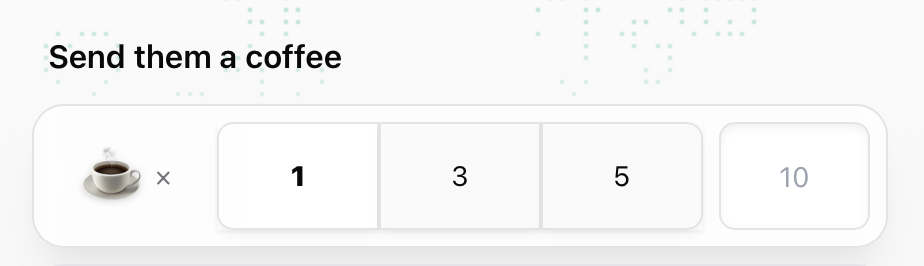
Visitors choose how many coffees to send: Sherpo instantly updates the total.
***
## How supporters contribute
When visitors open your Coffee page, they’ll see the emoji you chose on the right side of the screen, along with the minimum amount they can tip. **Visitors don’t need an account to contribute**: they simply pick a tier (or select an arbitrary number), optionally add a note, and enter their email to receive a receipt.
The checkout flow is optimized for speed: no login required, mobile-friendly, and powered by Stripe for secure payments.
***
### 1. Choose an amount
Visitors choose how many coffees to send: Sherpo instantly updates the total.
 ***
### 2. Leave a note (optional)
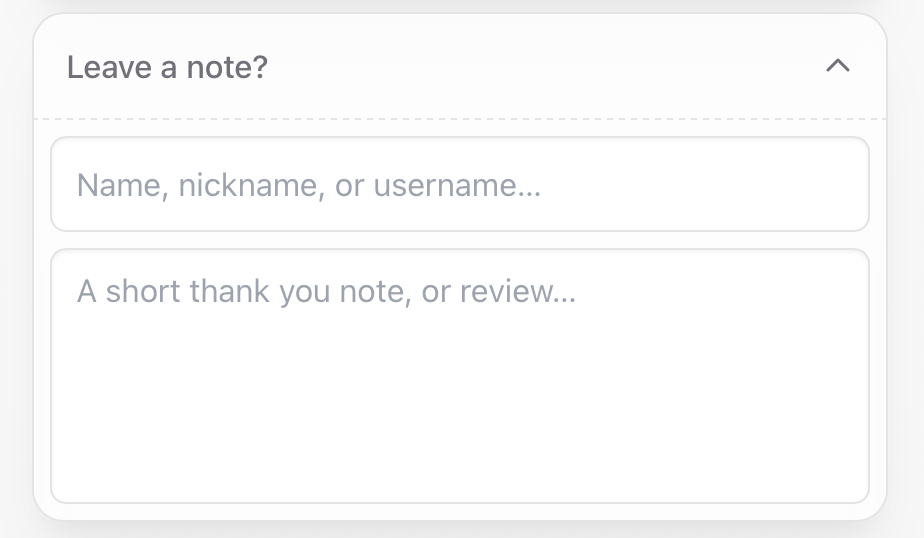
Supporters can include their name and a short thank-you note or message with their contribution: a nice touch for creators who want to connect with fans.
***
### 2. Leave a note (optional)
Supporters can include their name and a short thank-you note or message with their contribution: a nice touch for creators who want to connect with fans.
 ***
### 3. Add an email
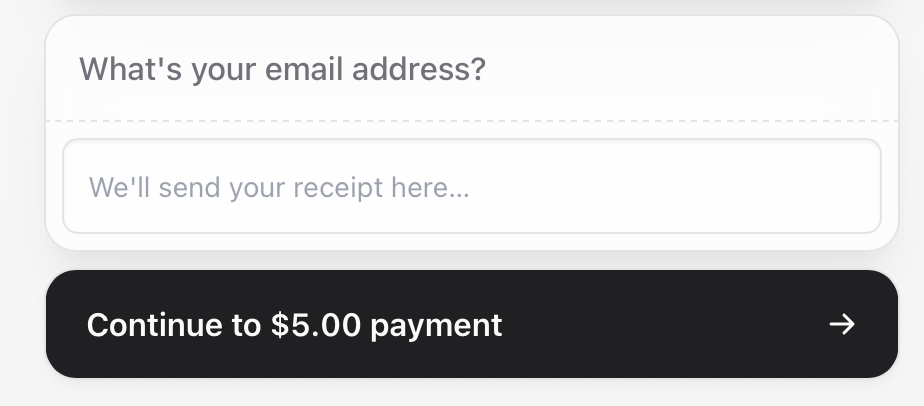
Before completing checkout, supporters must add their **email address**. This is where the confirmation and receipt are sent. Logged-in users will see this auto-filled.
***
### 3. Add an email
Before completing checkout, supporters must add their **email address**. This is where the confirmation and receipt are sent. Logged-in users will see this auto-filled.
 ***
### 4. Complete checkout
Payments are handled securely through **Stripe** and include multiple methods. Once payment is completed, Sherpo sends a confirmation email and adds the transaction to your **Sales** tab in real time.
***
## Fulfillment & payouts
Coffee payments don’t unlock any content or files: they’re purely one-time support gestures. After each transaction:
* The supporter gets a **receipt and confirmation email**.
* The creator’s connected **Stripe account** receives the payout.
You can view all tips under **Sales** and export them as CSV, JSON, or Markdown.
***
## Coffee example
Here’s how a live Coffee page can look like to visitors (but, of course, you can always fully customize it to your liking, using the page builder!):
***
### 4. Complete checkout
Payments are handled securely through **Stripe** and include multiple methods. Once payment is completed, Sherpo sends a confirmation email and adds the transaction to your **Sales** tab in real time.
***
## Fulfillment & payouts
Coffee payments don’t unlock any content or files: they’re purely one-time support gestures. After each transaction:
* The supporter gets a **receipt and confirmation email**.
* The creator’s connected **Stripe account** receives the payout.
You can view all tips under **Sales** and export them as CSV, JSON, or Markdown.
***
## Coffee example
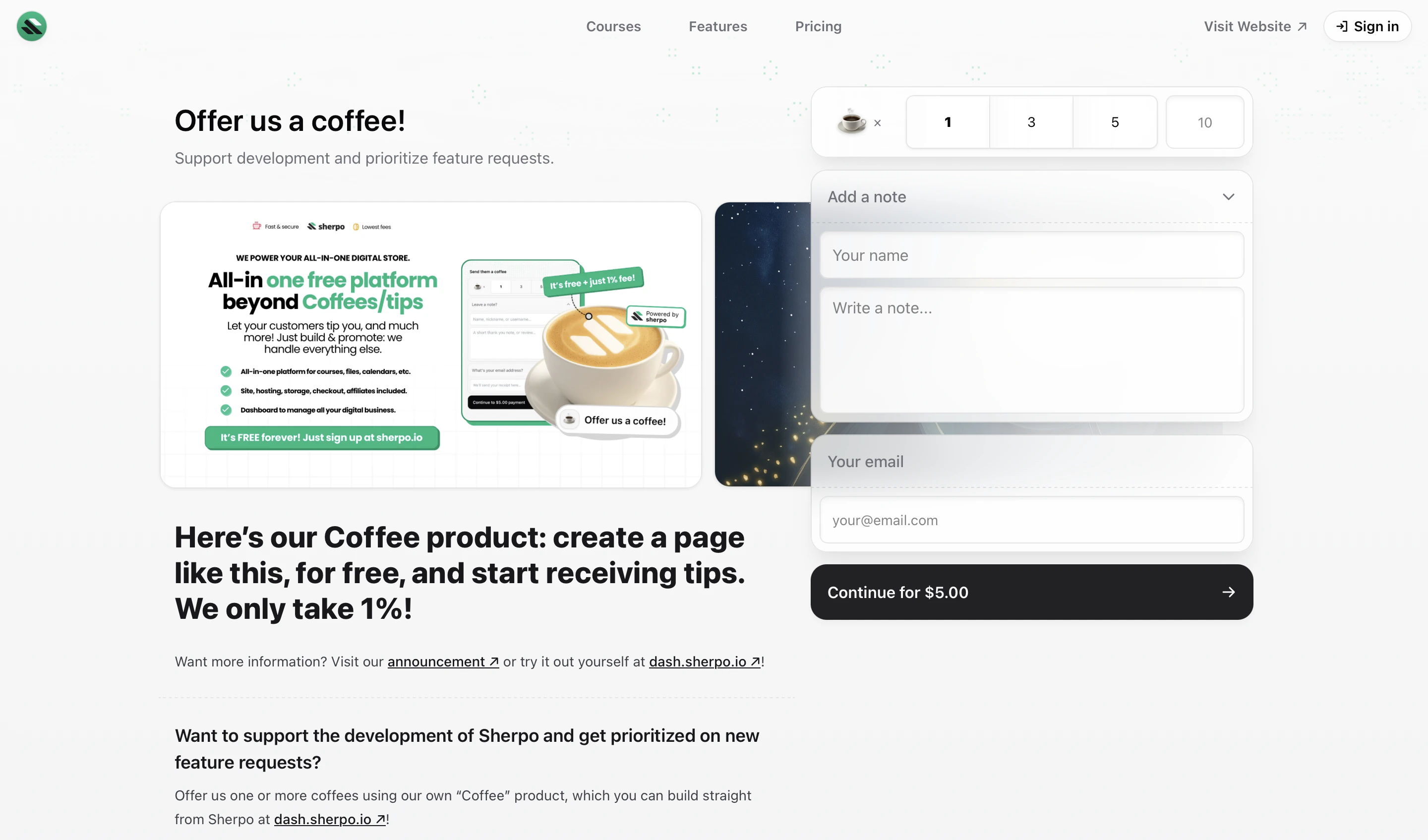
Here’s how a live Coffee page can look like to visitors (but, of course, you can always fully customize it to your liking, using the page builder!):
 Try it yourself on the [Coffee example page](https://demo.sherpo.io/p/coffee).
***
## FAQ
By default, Coffee appears on your homepage beside other ine products like **Goals** and **Calendar**, but it can be moved to the Product Grid. Visitors can access it directly from there or via its unique link.
Yes. They can include their name, nickname, and a short note during checkout. These notes appear in your dashboard.
No. Anyone can send a Coffee: they just enter their email address for the receipt. Logged-in users see this pre-filled.
Yes. You’ll see all contributions in your **Sales** tab and via email confirmations from Stripe.
No. Coffee is a pure support product: it doesn’t deliver downloads or access. To distribute files or other digital products, you’ll need to create other product types.
Yes. Sherpo automatically sends receipts and confirmation emails after each payment.
Try it yourself on the [Coffee example page](https://demo.sherpo.io/p/coffee).
***
## FAQ
By default, Coffee appears on your homepage beside other ine products like **Goals** and **Calendar**, but it can be moved to the Product Grid. Visitors can access it directly from there or via its unique link.
Yes. They can include their name, nickname, and a short note during checkout. These notes appear in your dashboard.
No. Anyone can send a Coffee: they just enter their email address for the receipt. Logged-in users see this pre-filled.
Yes. You’ll see all contributions in your **Sales** tab and via email confirmations from Stripe.
No. Coffee is a pure support product: it doesn’t deliver downloads or access. To distribute files or other digital products, you’ll need to create other product types.
Yes. Sherpo automatically sends receipts and confirmation emails after each payment.